The caffeine tracker that does the math for you
TrackCaffeine answers the question once. CoffeeLog answers it every day — logging what you drink, showing caffeine fade in real time, and warning you before it reaches your sleep.
Download on the App StoreiPhone · Apple Watch · free with optional upgrade
Caffeine is the world's most popular stimulant, yet almost nobody knows how much they actually have in their system at any moment. The number on a label is only a starting point: a 160 mg energy drink is still leaving roughly 77 mg in your bloodstream six hours later, and about 37 mg twelve hours later. That lingering tail is why an innocent afternoon coffee can quietly wreck a night's sleep.
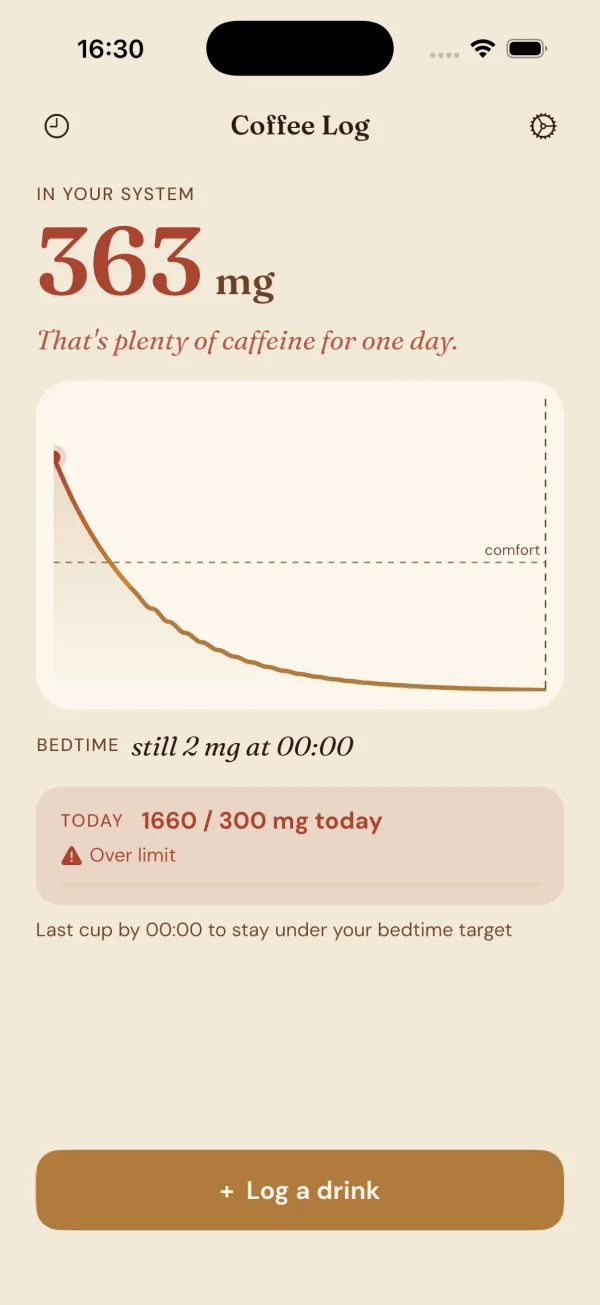
CoffeeLog turns that invisible chemistry into a number you can act on. You log a drink in one tap, and the app tracks the rise and fall of caffeine across your whole day using the same first-order decay model trusted in pharmacology — the same engine that powers every calculator on this site. Instead of guessing, you see exactly how much is in you now, how much will remain at bedtime, and the latest moment you can have one more cup without crossing the line that disturbs your sleep.
See it in action
What does the app do that this website cannot?
The app continuously tracks overlapping doses and shows a live decay curve for the whole day rather than a single static calculation, and the website cannot display a persistent, updating curve across your waking hours. The app records each cup as it happens, updates the on-device decay estimate in real time, and shows widgets and a bedtime readout that follow your day continuously.
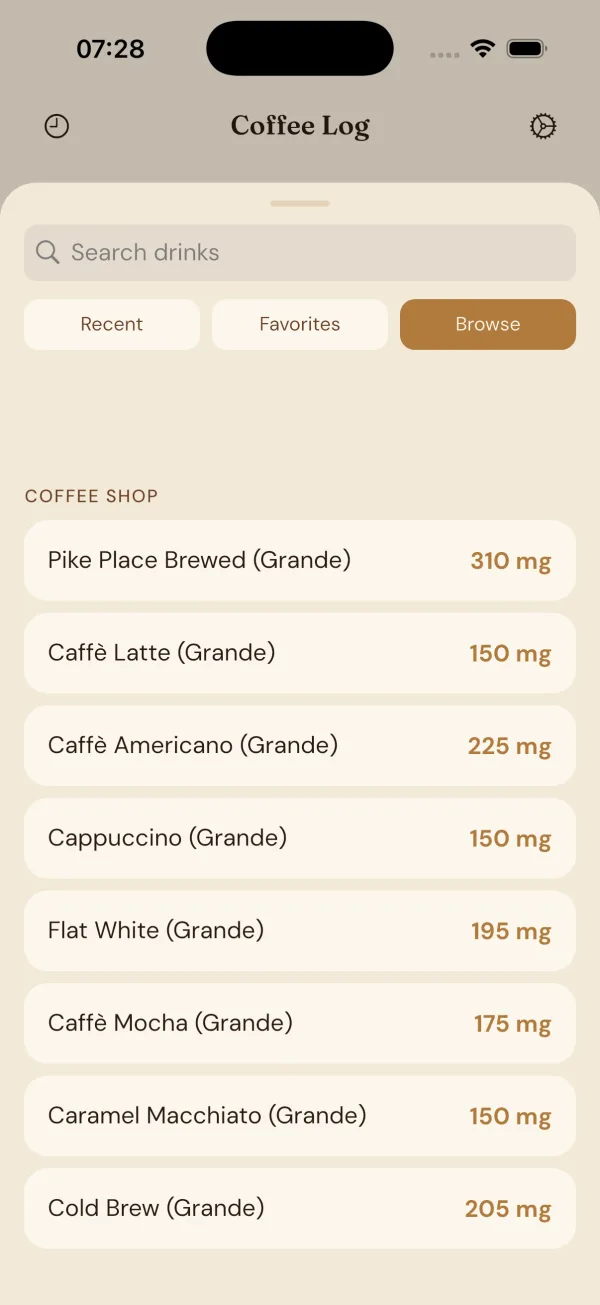
The app synchronises moment-to-moment logging with immediate visual feedback, for example by showing the decay curve after you log an Americano (126 mg) or a Cold brew (200 mg) from the same drink list the website publishes. Americano is 126 mg, Cold brew is 200 mg.
This continuous view is a mechanism: several doses overlap multiplicatively under the same model so a 126 mg Americano logged at 9:00 plus a 200 mg Cold brew logged at 13:00 produce a single summed decay curve the website can reproduce only as separate calculations, not as a persistent home-screen display. That mechanism matters when a late afternoon Cold brew (200 mg) overlaps residual caffeine from a morning Americano (126 mg) and changes the bedtime readout the app shows.
The app also offers a last-cup cutoff notification that can alert you when the model predicts a late cup will push you past a bedtime threshold, with the cutoff set from the same calculators on this site such as Latest cup before bedtime. The live widget and lock-screen readout are features that require frequent, local updates and therefore cannot be provided by a static web calculator.
The app optionally writes dietary caffeine to Apple Health and keeps an on-device log without requiring an account or a server-side record of what you drink; this private, device-local logging is a design choice to keep continuous tracking private and immediate. The dataset used to populate the app matches the published dataset at /dataset/ so the same drink entries appear in both places.
How does the maths in the app relate to the calculators here?
The app uses the same first-order elimination model and the same constants as the calculators on this site, so the numbers agree by design and the curves match given identical inputs. First-order elimination is a model in which the rate of elimination is proportional to the current amount of substance.
Remaining is the amount of caffeine in mg remaining in the body after a given number of hours according to the model; the app and the calculators both compute remaining = dose × 0.5^(hours ÷ 5.7). Remaining = dose × 0.5^(hours ÷ 5.7) is the exact formula used in the calculators and the app, with a population-average half-life of 5.7 hours (342 minutes).
For example, using a single Espresso (single) of 63 mg from the dataset, after one half-life of 5.7 hours the calculation is: remaining = 63 mg × 0.5^(5.7 ÷ 5.7) = 63 mg × 0.5^1 = 63 mg × 0.5 = 31.5 mg. That arithmetic is shown so you can compare the app's live readout with the caffeine half-life calculator on the site.
Another example: a Starbucks Pike Place Brewed (Grande) at 310 mg logged into the app will be modelled after 5.7 hours as remaining = 310 mg × 0.5^(5.7 ÷ 5.7) = 310 mg × 0.5 = 155 mg, which matches the calculators on the site and the side-by-side comparison. That numeric agreement is enforced by using the same formula and half-life constant both places.
The app sums overlapping remaining amounts from multiple logged drinks using the same first-order rule applied to each dose independently and then summed, which is the identical calculation performed by the site when you enter multiple cups into the multi-dose calculators at /tools/. Because the model is additive over independent doses, the app's live total at any moment equals what the site calculators would produce for the same timestamps and inputs.
What does "tracking caffeine" actually change for a person?
Tracking changes how you time caffeine relative to sleep by making the pharmacokinetics visible, not by improving willpower directly; the main behavioural change is timing choices around sleep. Sleep timing is the relevant clinical outcome because residual caffeine shifts sleep latency and duration, as shown by Drake et al. 2013, which found a 400 mg dose six hours before bedtime cost over an hour of sleep (Drake et al., 2013).
Tracking is a timing tool: it shifts decisions about the last cup toward an evidence-based cutoff rather than vague rules about "no coffee after noon"; the site calculators such as Latest cup before bedtime and the app's readout both translate doses into expected remaining mg at bedtime so you can set a bedtime threshold. A bedtime threshold converts pharmacokinetic outputs into timing guidance you can act on that evening.
For example, if you prefer to keep pre-bed residual caffeine under a target you choose, the app will show the summed remaining mg from a Latte (68 mg) and a Pour over (145 mg) so you can see whether their overlap pushes you above that target before sleep. Latte is 68 mg, Pour over is 145 mg, and the calculators on this site expose the same totals when you enter the same drinks.
Behavioural change is concrete: some users move a late social cup earlier, choose a lower-caffeine option such as Decaf coffee (3 mg) instead of a Cold brew (200 mg), or set a personal daily limit; Decaf coffee is 3 mg and Cold brew is 200 mg in the dataset, and the site provides a safe daily limit calculator you can consult. The app surfaces those choices in real time so timing replaces guesswork.
What does the app deliberately not do?
The app does not diagnose medical conditions, it does not personalise half-life beyond the population average, and it does not give prescriptive dose advice; it is informational only. The product is explicitly a tracker and visualiser of modelled caffeine amounts, not a clinical diagnostic or a personalised dosing tool.
The app does not require an account and does not store your detailed drink log on a server; the log stays on your device and any optional Apple Health write of dietary caffeine is controlled and reversible by the user. The privacy design mirrors the site's privacy stance detailed at /privacy/ and the app's data handling is described in the same terms on the product page.
The app also does not claim to change physiology; it models pharmacokinetics using a population half-life of 5.7 hours (342 minutes) and any individual half-life may differ, which is a caveat you should treat as a limitation. Individual factors can lengthen or shorten elimination, so the app provides a consistent population estimate but avoids claiming medical precision.
The app is not a substitute for medical counsel for pregnancy, adolescents, or health conditions; for formal guidance about safe caffeine intake consult authoritative sources such as the FDA which states a 400 mg/day limit for healthy adults (FDA) and clinical literature such as Drake et al. 2013 on sleep effects (Drake et al. 2013). Those sources are the basis for guidance, not the app itself.
What happens to your data?
Your drink log is stored locally on the device by default and the app does not upload identifiable drink histories to a server; this on-device log is the default privacy posture. On-device log is a local file or database kept on your handset only, and any syncing or backup mechanisms are under the user's control.
Optional features include a local Apple Health write of dietary caffeine which the user must enable; any Apple Health write follows Apple's privacy model and can be revoked by the user. The dataset that populates the drink list is published under a permissive licence at /dataset/ and carries a CC licence for reuse (CC BY 4.0).
Corrections and source questions about drink values on the site and in the app should be sent via the site's contact channel at /contacts/, and the author documents methods and sources at /about/. The dataset values for drinks such as Drip coffee (96 mg), Pour over (145 mg), and Bang (300 mg) are traceable to the published dataset entries on the site and are the numbers the app uses. Drip coffee is 96 mg, Pour over is 145 mg, Bang is 300 mg.
Who is it not for?
The app is not for anyone seeking medical diagnosis, personalised pharmacokinetic curves beyond a population average, or clinical dosing recommendations. If you need medical advice about caffeine during pregnancy, in adolescence, or with health conditions, consult a qualified clinician rather than relying on the app.
The app is also not intended for users who want cloud-backed, shareable drink histories; it deliberately focuses on an on-device log with no mandatory account and no server-side record of what you drink. If you prefer social sharing of intake or integrated remote analytics, the design choice here means the product will not provide those features.
If you want to check individual drink values on the dataset or compare two drinks side-by-side before adding them, use the site's index at /caffeine-in/, the dataset at /dataset/, and the comparison calculator at /tools/caffeine-comparison/. See specific entries such as Drip coffee (96 mg) and Latte (68 mg) for single-item values before you log them in the app. Drip coffee is 96 mg and Latte is 68 mg.
This page complements the site's calculators such as /tools/caffeine-calculator/, the bedtime cutoff tool at /tools/last-cup-before-bed/, and the safe intake guidance at /tools/safe-daily-limit/, and it explains the feature set without implying clinical authority. The app is not published on the App Store at this time and should not be represented as available for download.
Everything CoffeeLog does
One-tap logging
Pick from 87 built-in drinks — coffees, teas, energy drinks, sodas and supplements — or save your own. No typing milligrams, no guesswork.
Live decay curve
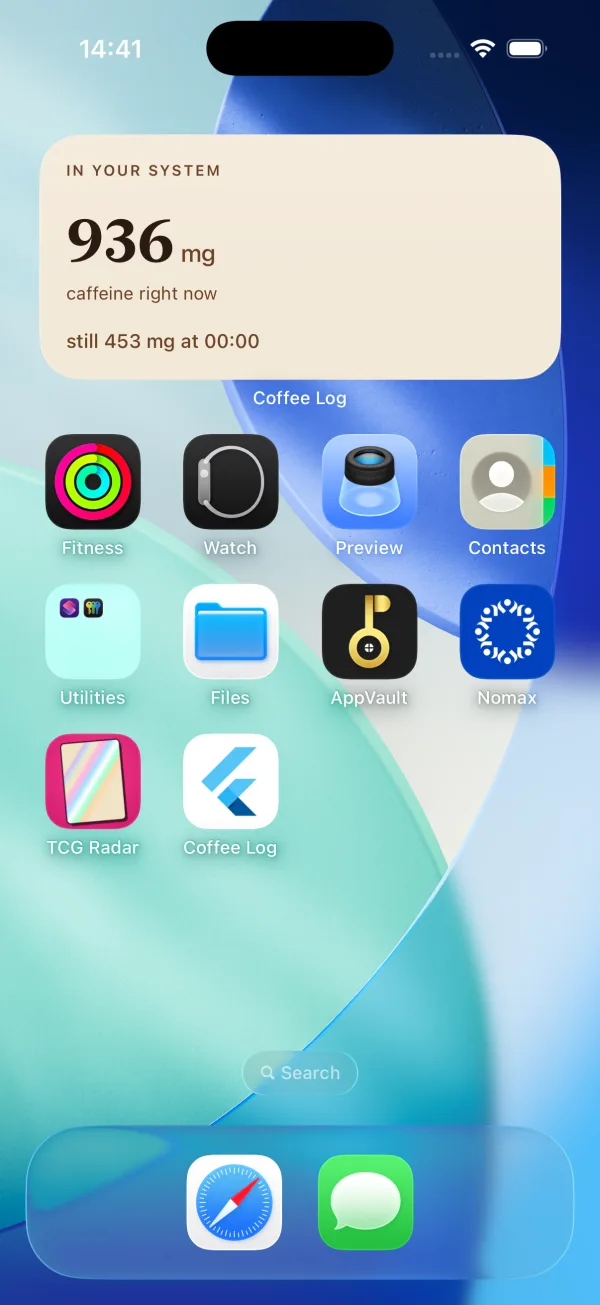
Watch caffeine fade in real time. The home screen and lock-screen widget show how much is in your system right now and how much remains at bedtime.
Sleep guard
CoffeeLog computes your personal “last cup” time so caffeine drops below your comfort level before you sleep — then nudges you as the cutoff nears.
Apple Health
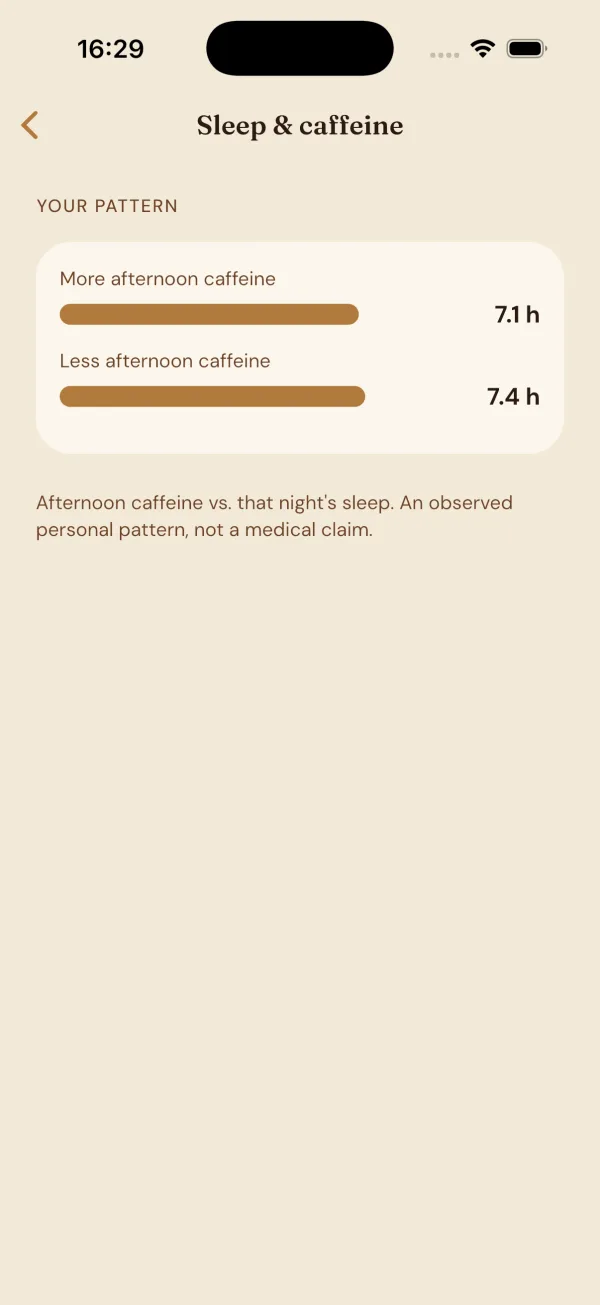
Optionally write dietary caffeine to Apple Health and read your sleep to surface your own pattern: more afternoon caffeine versus less, and what it does to your nights.
Daily limit
A 400 mg default you can tune to your body. A clear running total across every drink keeps you under your ceiling without doing the math.
Private by design
Your log and profile stay on your device. No account, no sign-up. Nothing about what you drink is sent to our servers.
How CoffeeLog works
Every time you have something caffeinated, you tap it in — the app already knows the milligrams for 87 common drinks, so logging a Grande latte or a can of Monster takes a second. From there, CoffeeLog plots each dose on a decay curve and adds them together. The home screen shows your live total; the widget keeps it on your lock screen; and the bedtime readout tells you how much will still be circulating when your head hits the pillow.
The part people find most useful is the reverse calculation. Tell CoffeeLog your bedtime, and it works out the latest clock time you can have a standard cup and still fall below the level that typically harms sleep. Over time, with optional Apple Health access, it also surfaces your own pattern — how your afternoon caffeine relates to the sleep you actually got — as an observed personal trend, not a medical claim. Everything stays on your device.
Frequently asked questions
How does CoffeeLog calculate caffeine in my body?
It uses first-order pharmacokinetics: each drink decays on its own curve with a half-life of about 5.7 hours, and the app sums them. mg remaining = dose × 0.5^(minutes ÷ half-life) — the same model behind the calculators on this site.
Is CoffeeLog free?
CoffeeLog has a free tier and an optional subscription for advanced features, billed through the App Store. You can cancel anytime in your Apple ID settings.
Does CoffeeLog need an account?
No. There is no sign-up. Your drink log and profile are stored locally on your iPhone, and nothing is sent to our servers.
Does it work with Apple Health and Apple Watch?
Yes. With your permission it can write dietary caffeine to Apple Health and read sleep data, and it includes an Apple Watch and home-screen widget for your current level.
Which drinks are included?
CoffeeLog ships with 87 common drinks across 8 categories — espresso drinks, brewed coffee, coffee-shop items, energy drinks, tea, soda, pre-workout and more — the same dataset this website is built on.
Ready when CoffeeLog launches
The app is in final review. Use the reference and calculators now, and grab CoffeeLog the day it goes live.
Download on the App StoreTrackCaffeine provides general reference information about caffeine. It is not medical advice. Caffeine values are public-source estimates, not exact measurements.